ファイル:Polynomialdeg3.svg

提供: testwiki
ナビゲーションに移動 検索に移動
元のファイル (SVG ファイル、400 × 400 ピクセル、ファイルサイズ: 737バイト)

このファイルはウィキメディア・コモンズのものであり、他のプロジェクトで使用されている可能性があります。 ウィキメディア・コモンズでのファイル解説ページにある説明を以下に示します。

概要

解説

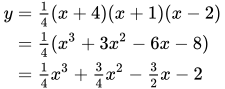
Polynomial of degree 3 with roots at 2, -1, and -4:

日付
原典 Polynomialdeg3.png
作者 N.Mori
許可
(ファイルの再利用)
Public domain この著作物は、著作者であるN.Moriによって権利が放棄され、パブリックドメインとされました。これは全世界で適用されます。
一部の国では、これが法的に可能ではない場合があります。その場合は、次のように宣言します。
N.Moriは、あらゆる人に対して、法により必要とされている条件を除き、如何なる条件も課すことなく、あらゆる目的のためにこの著作物を使用する権利を与えます。
SVG 開発
InfoField
 このSVGのソースコードは正しい
 この ベクター画像Matplotlibで作成されました。
ソースコード
InfoField

Python code

Source code
# Author: Ika, 2013-07-24
from pylab import *
import pylab as pl
import numpy as np

# Create a figure of size 8x6 points, 80 dots per inch
pl.figure(figsize=(8,8), dpi=80)

# Create a plot of the cubic function y=(x+4)(x+1)(x-2)/4
x = np.linspace(-5.0,4.0,256, endpoint=True)
y = (x+4)*(x+1)*(x-2)/4
pl.plot(x,y,color="magenta", linewidth=3.0, linestyle="-")

# Set labels
pl.xlim(-5,4)
pl.ylim(-4,7)

# Move the spines
ax = pl.gca()
ax.set_xlabel('x')
ax.set_ylabel('y')
ax.text(-5, 3, r'$y=\frac{1}{4}(x+4)(x+1)(x-2)$', fontsize=20)

# Set up the grid
ax.spines['right'].set_color('none')
ax.spines['top'].set_color('none')
ax.xaxis.set_ticks_position('bottom')
ax.spines['bottom'].set_position(('data',0))
ax.yaxis.set_ticks_position('left')
ax.spines['left'].set_position(('data',0))
ax.grid(color="grey",linestyle='--',linewidth=1)

# Save the figure to the output SVG file
plt.savefig("Cubic_Function_SVG.svg");

キャプション

このファイルの内容を1行で記述してください
Graphing of a third degree polynomial, with roots at -4, -1 and 2, and a y-intercept of -2.

このファイルに描写されている項目

題材

6 1 2007

737 バイト

6b25de438d8c38ccbc816cead66e0c79b7d47094

ファイルの履歴

過去の版のファイルを表示するには、その版の日時をクリックしてください。

日時サムネイル寸法利用者コメント
現在の版2015年1月2日 (金) 17:332015年1月2日 (金) 17:33時点における版のサムネイル400 × 400 (737バイト)wikimediacommons>KrishnavedalaReverted to version as of 13:02, 30 August 2008: Cleaner rendering. text and graph not clear in the newly uploaded version.

以下の​ 2 ページがこのファイルを使用しています: